
Block QA Until Build Is Done: Phase Gates in Asana
Your board has two sections. "Build" and "QA." The rule is simple in your head: nothing in QA starts until everything in Build is finished. A hard phase gate.
Asana can't enforce that. Not really. You can mark one QA task as blocked by one Build task, by hand, one link at a time. But a phase gate isn't one link. It's every QA task depending on every Build task. Five Build tasks and four QA tasks is twenty links. Add one more task to either side and you are back in the task detail pane, wiring by hand, hoping you didn't miss a pair.
And Asana's rules can't do it at all. There's no rule action that says "depend on a whole section." So QA creeps forward while Build is still open, someone picks up a QA task early, and the gate you meant to have was never really there.
DepFlow adds the one rule that sets the whole gate for you.
Here's how, in about a minute.
What you're building
You want one thing: every task in QA depends on all of Build. Nothing in QA can sensibly start until the last Build task is done. When Build finishes, the entire QA section unblocks together.
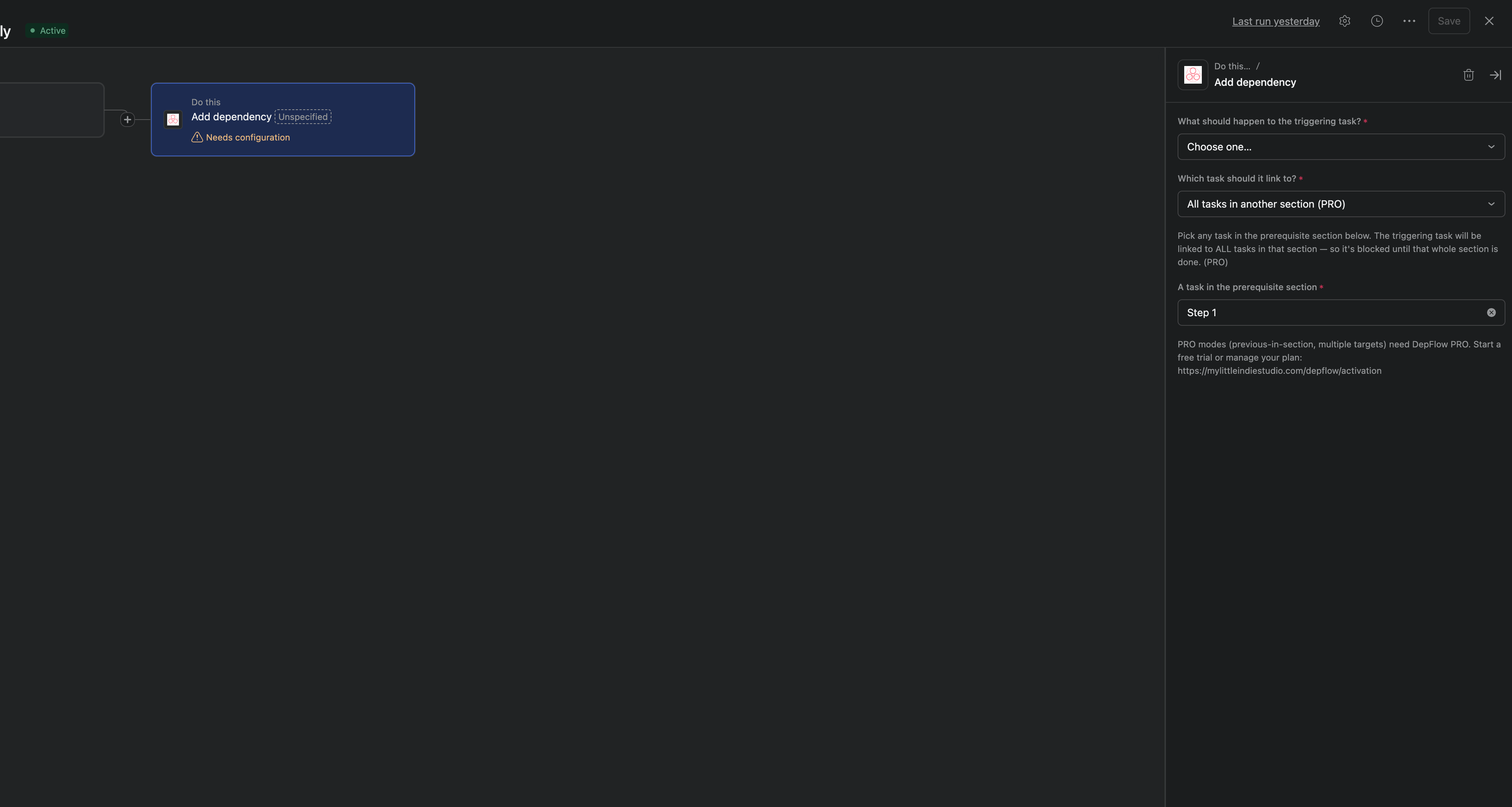
That's the All tasks in another section target of DepFlow's Add dependency action, in the depends on direction.
Set it up
You add the rule once. After that, any task that lands in QA gets wired to the whole Build section automatically.
- Open your project and go to Customize → Rules → Add rule.
- Pick the trigger Task added to section: QA. (Any Asana trigger works, but this one fires exactly when a task enters QA, which is the moment you want the gate applied.)
- Click Add action, then choose DepFlow.
- Pick the Add dependency action.
- In the direction dropdown, choose depends on (the triggering task gets blocked).
- In the target dropdown, choose All tasks in another section.
- Asana forms can't point at a section directly, so pick any one task inside Build in the "A task in the prerequisite section" field. DepFlow reads that task's section and uses all of its tasks.
- Publish the rule.
DepFlow resolves the Build section at run time, so you never have to keep the rule updated. Add a task to Build later, and the next QA task that triggers depends on it too.
Two things worth knowing.
Re-running is safe. Fire the rule twice and nothing doubles up. Asana ignores links that already exist, and DepFlow skips what it already wired. And it skips quietly. If something can't be wired, DepFlow does nothing and records why, so your rule never turns into a red error in Asana.
What you get
The moment a task enters QA, it shows "Blocked by" and lists every task in Build. A small lock sits on it. Anyone looking at the QA column can see none of it is ready to start.
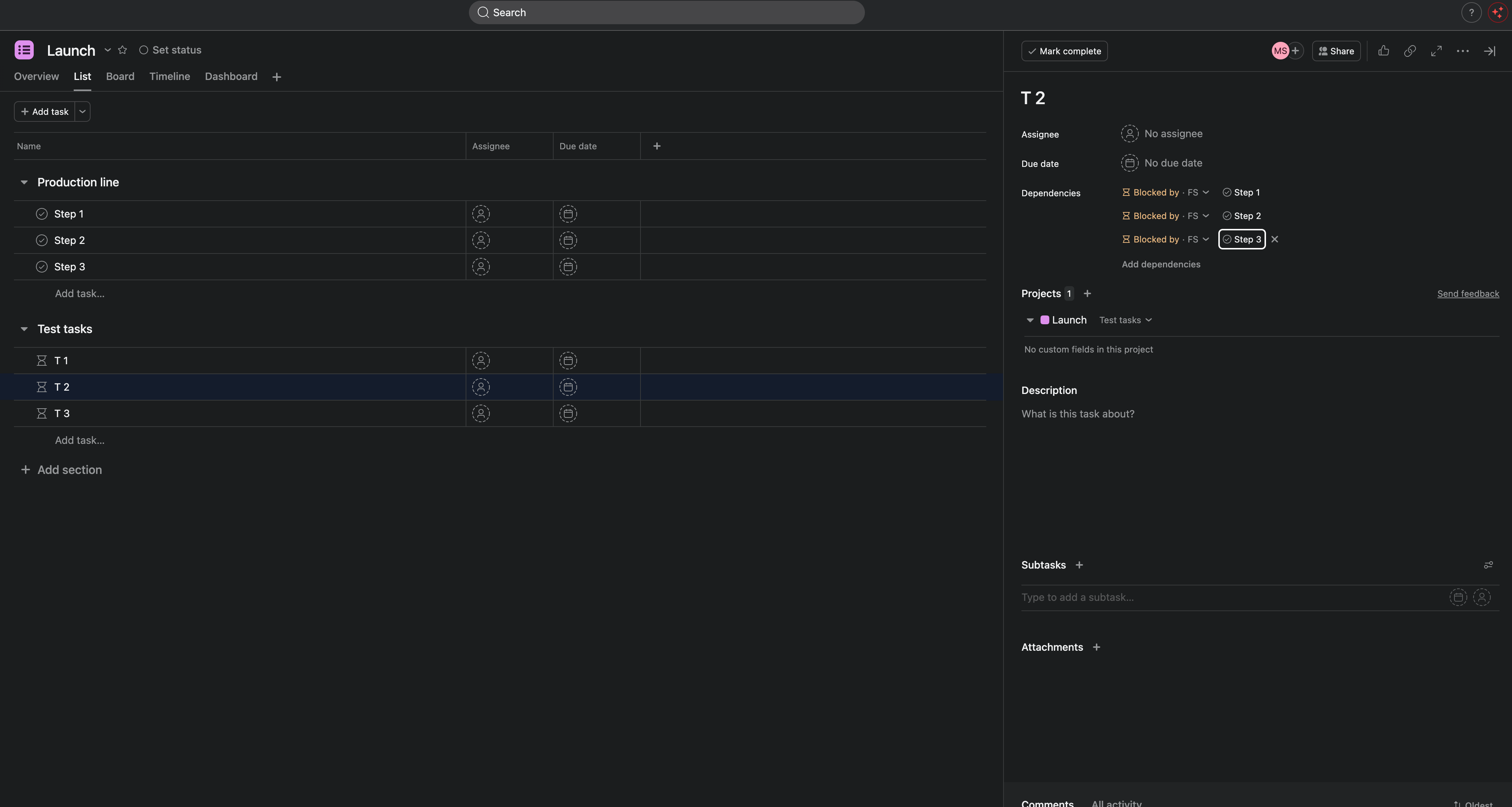
Then the team works through Build. As each Build task closes, it drops off the blocker list on every QA task at once. When the last Build task completes, the whole QA section unblocks together, and their assignees get notified. Build finishes and QA opens in the same moment.
One thing to be straight about: Asana dependencies are advisory. They warn, they don't hard-lock. A blocked task shows the warning and notifies people, but Asana won't physically stop someone from force-closing it. That's Asana's behavior for every dependency, hand-made or not. What DepFlow does is set those dependencies for you, across a whole section, in one rule, instead of you wiring every pair by hand.
The plan, honestly
All tasks in another section is on the Free plan. Every dependency mode is, up to 100 rule runs per month across your workspace. So you can put a real phase gate on your board today without paying.
DepFlow's PRO plan removes the monthly cap and adds two extra actions (Smart assign and Scheduled comment). If your board triggers this gate often, PRO is what takes the 100-run ceiling off. The section-gate behavior itself costs you nothing to start.
A couple of limits to keep in mind. Each section is read up to 50 tasks per run. And Asana caps a single task at 30 dependencies, so if Build has more than 30 tasks, each QA task would hit that platform ceiling. For a Build-to-QA gate that's rarely a problem, but it's worth knowing before you point this at a section of a hundred tasks.
Related reads
- Chain a whole section top to bottom: instead of gating one section behind another, make each task in a single section wait for the one above it, so the column runs as a sequence.
- DepFlow is the five rule actions Asana forgot to ship, one add-on that fills the gaps in Asana's own rule builder. The section gate is one of them.
Get DepFlow: it is free on the Asana App Directory. Install it once, add a rule, and it does the wiring the moment your rule fires. See all the actions and plans.