
5 Asana Rule Actions That Don't Exist, and How to Add Them
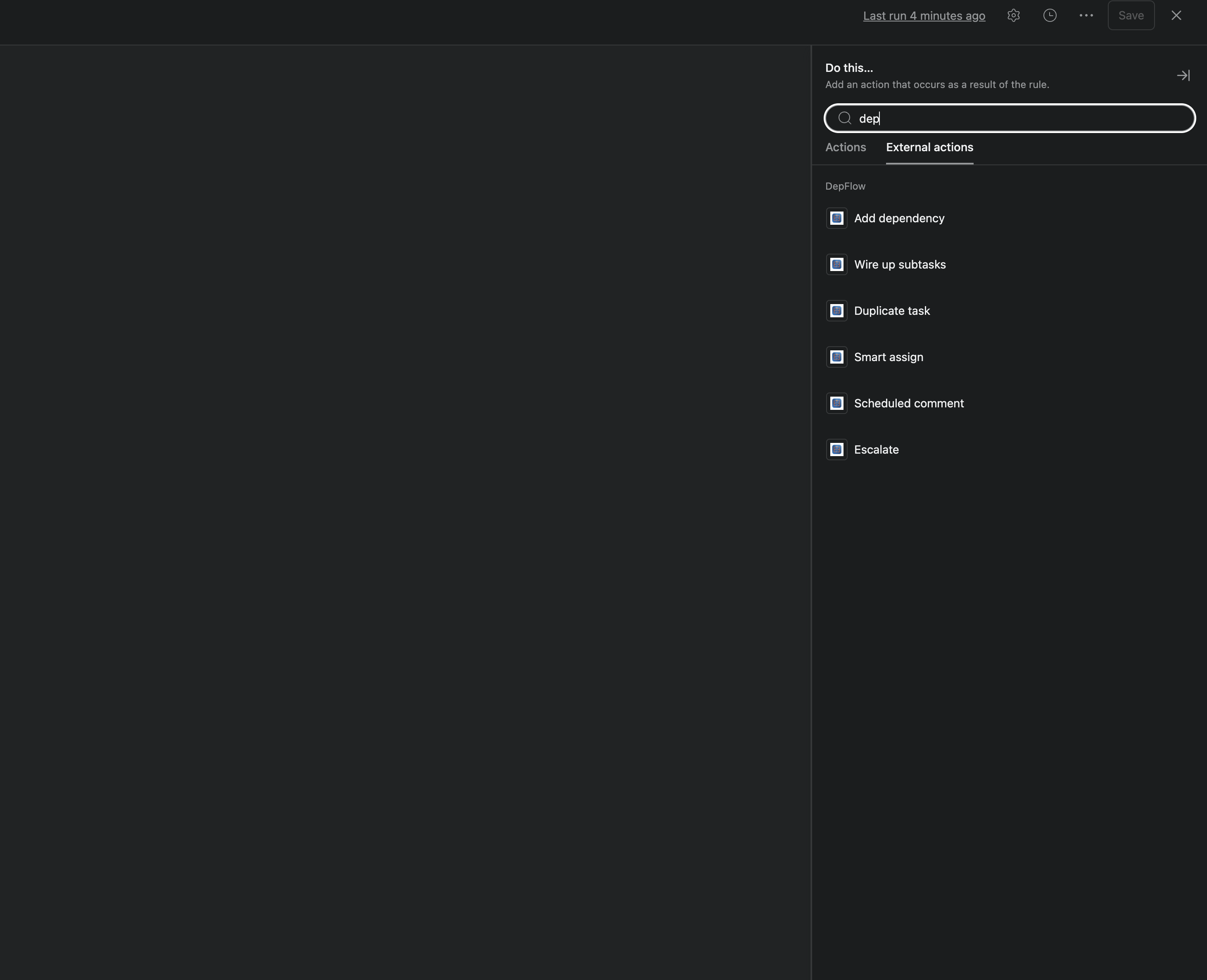
You already lean on Asana Rules. A task lands in a project, a rule moves it, tags it, maybe spins up a checklist of subtasks. That part works.
Then the rule finishes, and you take over by hand. You open each new subtask and set what waits on what. You duplicate the same task for the third client this week. You decide, again, whose turn it is to pick up the next request. The rule did the easy 80%. You do the structural 20%, every single time.
Here are five things Asana Rules genuinely can't do, no matter how you configure them. Each one is a real gap, and each has a fix. DepFlow adds them as native rule actions that sit right next to Asana's own.
1. Set dependencies on rule-created subtasks
A rule spawns "Draft → Edit → SEO → Publish" under Publish blog post, and Asana drops them in flat, everything startable at once. To make them run in order, you open each subtask and mark "waiting on" by hand. Asana Rules can't create a single dependency for you.
That's what the Wire up subtasks action fixes. Pick Chain and, the moment those subtasks appear, each one waits for the one before it: a strict sequence, zero clicks. Parent waits for all subtasks and Subtasks wait for parent are the two other modes. Asana dependencies warn, they don't hard-lock, and DepFlow sets them for you.
Reach for it whenever your rules or templates generate a checklist that must happen in order.
Read the deep-dive: How to Automatically Chain Subtasks in Asana, plus the two milestone modes, Parent waits for all subtasks and Subtasks wait for parent.
2. Sequential and section-level phase gates
Sometimes your steps aren't subtasks, they're tasks in a section. Employee onboarding: Paperwork → Accounts → Training → First assignment. You want each to wait for the one above it, and you want the whole QA section gated behind Build. By hand that's dozens of "waiting on" clicks, redone every time the list changes.
The Add dependency action handles both. Target The previous task in the section to chain a whole column top to bottom, or All tasks in another section to gate one phase behind another. One run wires the full ladder, and it stays correct as you reorder tasks (just re-run).
This one earns its keep on phase-based projects and process sections: a hiring pipeline, a manufacturing/QA line, or Discovery → Build → Launch.
Read the deep-dive: Chain a whole section, top to bottom and Gate one phase behind another.
3. Duplicate a task
Every new client, the same checklist. So you open the task, hit ⋯ → Duplicate, rename it, drag it into the right project, then do it again for the next one. Asana Rules can duplicate a rule or a project. There is no rule action that duplicates a task.
Enter the Duplicate task action. On a trigger, it creates a real, independent copy. You choose what carries over (subtasks, assignee, description, attachments), where it lands (same section or a specific project), how the due date shifts, and a name built from placeholders like {original_name} ({date}). No more "Copy of Copy of."
It fits recurring work and intake patterns: a weekly report, a per-client onboarding checklist, or a triaged request copied from Inbox into Backlog.
Read the deep-dive: How to Automatically Duplicate a Task in Asana.
4. Smart, balanced assignment
Incoming requests land on whoever didn't look away fast enough, so one person has 40 open and everyone else has 3. An Asana rule can assign, but only to one fixed, hard-coded person. It can't balance load, take turns, or skip someone on leave.
The Smart assign action closes that gap. Pick a pool (a team, or everyone in the workspace) and a strategy. Least loaded hands the task to whoever has the fewest open tasks; Round-robin rotates fairly in turn. Either way it skips anyone marked out of office, then picks them back up when they return.
If you run Asana as a request queue, this is your action: support, ops, a review roster, or an on-call list.
Read the deep-dive: How to Auto-Assign to the Least Busy Person in Asana.
5. Time-delayed comments and SLA escalation
A task stalls, and two days later you meant to nudge it, and forgot. Asana posts a comment the instant a rule fires. "Two days later," it simply can't do. There's no wait step, and no way to check back and escalate only if the task is still stuck.
Here DepFlow gives you two PRO actions. Scheduled comment holds a comment and posts it later, after a delay or on a chosen date. It's the timer Asana doesn't give you. Escalate is the SLA timer: it waits, re-checks the task, and only nudges (comment, reassign, or add a follower) if it's still stalled. Nothing fires on tasks that already moved.
Anyone tracking SLAs, follow-ups, launch-day reminders, or "if this is still open in 2 days, ping the owner" wants these.
Read the deep-dive: Post a comment later in Asana and Build an SLA / escalation timer in Asana.
Pricing, and how to get it
Chain subtasks is free, forever, along with the rest of the dependency modes and the full Duplicate task action, up to 100 runs per month per workspace. One PRO subscription lifts that cap and unlocks every other action: Smart assign, Scheduled comment, and Escalate.
Everything DepFlow creates is a normal, native Asana dependency. You can see, edit, or delete it exactly like a hand-made one. Nothing locks you in.
Install DepFlow free from the Asana App Directory, add one rule to your next project, and stop doing structural work a rule should do.
Get DepFlow: it is free on the Asana App Directory. Install it once, add a rule, and it does the wiring the moment your rule fires. See all the actions and plans.